Introduction
In many industrial and architectural projects, the client’s initial idea does not start with technical drawings or CAD files. It often begins as a simple hand-drawn sketch that represents a mental image of the desired factory layout.
The real challenge is transforming this raw concept into a clear, realistic, and decision-ready visual before any physical execution begins.
This article explains a structured workflow that converts a hand-drawn factory sketch into a realistic 3D visualization using a hybrid approach: human design thinking enhanced by artificial intelligence.
I’ve used Gemini Pro (Nano Banana Pro) for generating all the images in this tutorial.
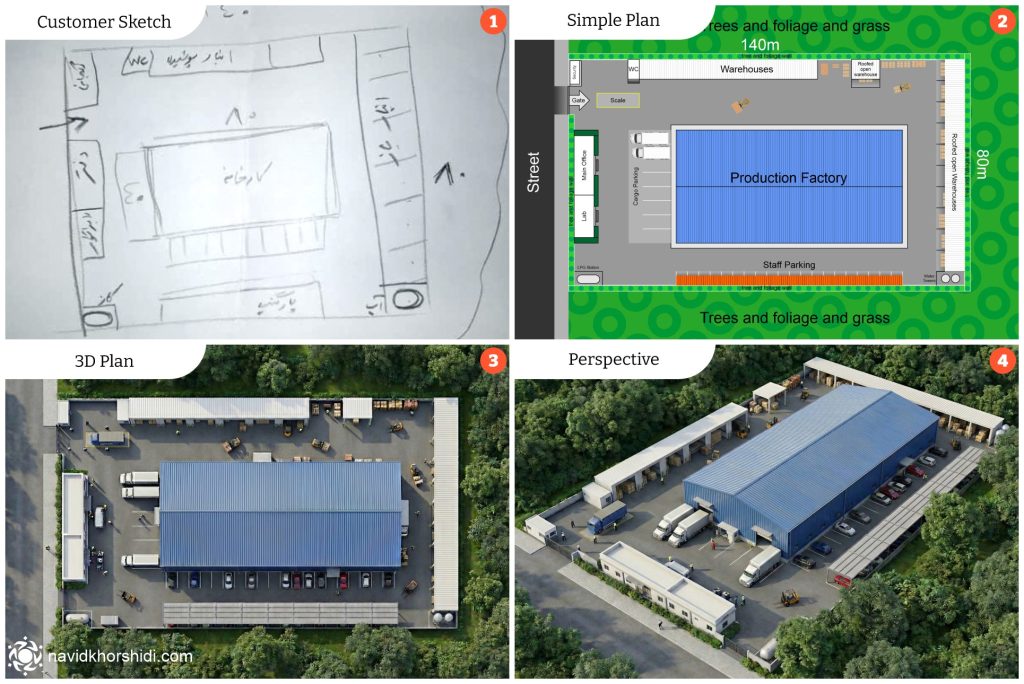
Converting the Hand Sketch into a Digital Plan
The process began with a rough line drawing provided by the client, illustrating the factory layout as envisioned in their mind.
This sketch was translated into a clean and simple digital plan on the computer.
At this stage, the focus was not on engineering precision, but on:
- Spatial relationships
- Functional zoning
- Logical circulation paths
Objective:
Create a clear and AI-readable base map that accurately represents the client’s intent.
AI-Based 3D Plan Generation
The simplified digital plan was then used as input for AI-powered visualization tools.
Through artificial intelligence:
- Volumes were generated
- Spatial depth was introduced
- The flat plan evolved into a three-dimensional structure
AI significantly accelerated the visualization phase, while creative control and decision-making remained fully human-driven.
Here’s the prompt that I’ve used after I uploaded the simple plan image:
Create a realistic 3d render image based on the plan provided, with a realistic overcast sunlight, high quality professional render
Perspective Selection and Spatial Composition
After generating the initial 3D output, the next step was selecting an effective perspective.
The chosen viewpoint was designed to:
- Clearly communicate scale
- Showcase circulation and logistics
- Provide an intuitive understanding of the factory layout
A strong perspective turns a technical model into a communication asset.
Here’s the prompt that I’ve used after I reuploaded the generated image:
Change the camera angle for this image to isometric view from bottom left, keep all the elements and proportions the same, high quality professional render
Professional Retouching in Photoshop
Raw 3D outputs rarely communicate realism on their own.
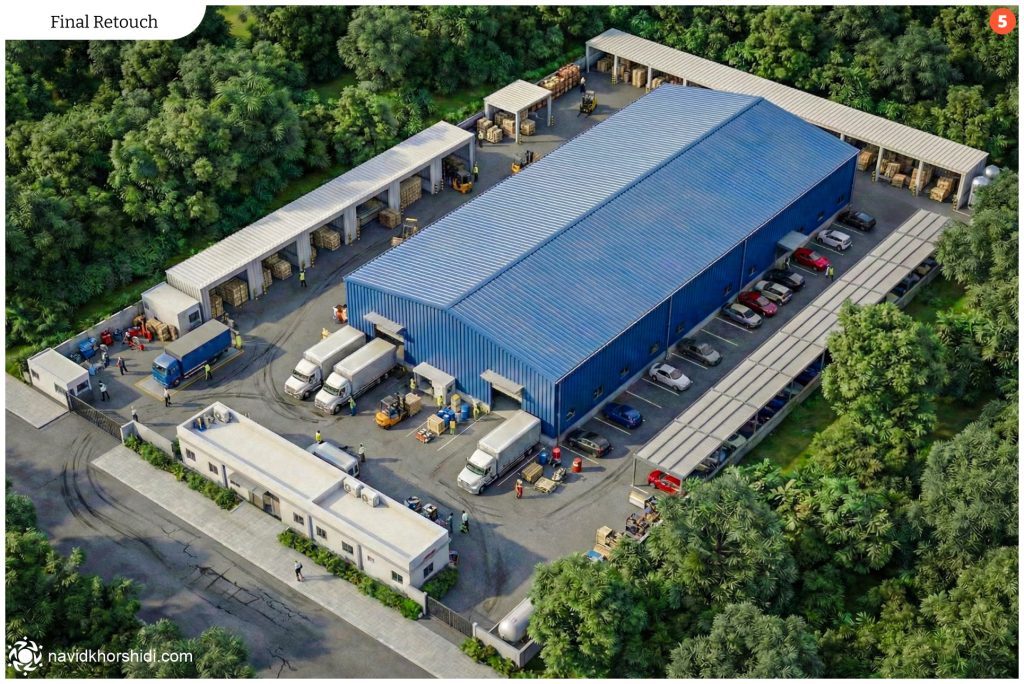
To elevate the image to a presentation-ready level, professional retouching was performed in Adobe Photoshop, including:
- Light and color correction
- Contrast and depth enhancement
- Material and surface refinement
At this stage, the image transitioned from a “render” into a decision-making visual.
Adding Functional and Environmental Elements
To fully communicate how the factory operates in real life, essential elements were added manually:
- Human figures for scale reference
- Trucks and loading vehicles
- Forklifts and industrial equipment
- Secondary environmental details
These additions transformed the image into a realistic operational scenario rather than a static architectural
Why This Workflow Is Effective
This combined AI + human design workflow delivers tangible business value:
- Faster concept validation
- Reduced risk before construction
- Improved client understanding
- Easier iteration and refinement
- Stronger presentations for stakeholders and investors
AI enhances speed, but design intelligence defines quality.
Conclusion
Artificial intelligence does not replace designers, It empowers designers who know how to control it.
When AI is guided by spatial understanding, visual literacy, and professional judgment, it becomes a powerful tool for transforming abstract ideas into clear, realistic, and actionable visuals.
This project demonstrates how a simple sketch can evolve into a realistic 3D factory visualization—long before the first brick is laid.